
内容简介:介绍用 AI Agent 控制智能电器的一次实验。尝试通过 agentgateway 代理所有 LLM 与 MCP 流量,实现集中认证、配置、tracing。
缘起
基于上期的 HA + 小米智能家居 = 失业宅心灵鸡汤 基础上。我想试试:
- 集成 Dify AI Agent 控制智能电器
- 所有 LLM 与 MCP 流量,由 agentgateway 代理,希望能集中:认证、配置、tracing、计费
- 重视 prompt / LLM / MCP 可视察性(MLOps),为以后的迭代改进提供数据。用 phoenix 保存和管理 tracing 。
目标
目标不是实现一个实用性高和功能强大的家电 Chat Agent 。只是想做个 PoC(proof of concept) 。真实经历一下 LLM Agent + MCP + agentgateway 下的集成和可视察性实现。
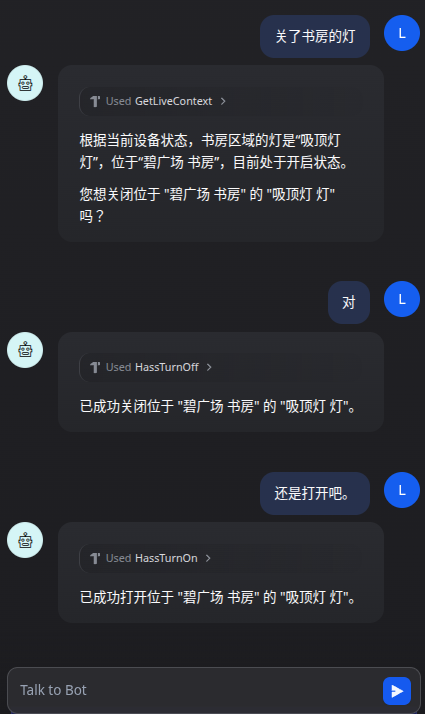
基础环境
Home Assistant MCP 工具集
on/opens/presses a device or entity. For locks, this performs a ’lock’ action. Use for requests like ’turn on’, ‘activate’, ’enable’, or ’lock’.
off/closes a device or entity. For locks, this performs an ‘unlock’ action. Use for requests like ’turn off’, ‘deactivate’, ‘disable’, or ‘unlock’.
Provides real-time information about the CURRENT state, value, or mode of devices, sensors, entities, or areas. Use this tool for: 1. Answering questions about current conditions (e.g., ‘Is the light on?’). 2. As the first step in conditional actions (e.g., ‘If the weather is rainy, turn off sprinklers’ requires checking the weather first).
部署方案

智能家电集成 AI agent 部署图
如上图排版有问题,请点这里用 Draw.io 打开
Dify Agent Prompt
 1
 2
 3
 4
 5
 6
 7
 8
 9
10
11
12
13
14
15
16
17
18
19
20
21
22
23
24
25
26
27
28
29
30
31
32
33
34
35
36
37
38
39
40
41
42
43
|
You are a Smart Home Assistant integrated with Home Assistant through MCP.

Your responsibilities:

1. Interpret user requests about smart home devices.
2. ALWAYS use the `GetLiveContext` tool to fuzzy match device names/area and get their current states, formal `name` and `area` properties before taking any action. ALWAYS use formal `name` and `area` properties obtained from `GetLiveContext` response in subsequent steps. NEVER try to trim or adjust device names and areas from `GetLiveContext` by yourself.
3. ALWAYS ask for explicit confirmation before performing any action that changes a device state (on/off, toggle, brightness, scene activation). Always show `name` and `area` properties of devices to be controlled.
4. When confirmation is received, call the appropriate Home Assistant MCP tool. While calling Home Assistant MCP tool, make sure always pass formal and full `name` and `area` value you obtained from `GetLiveContext` response. NEVER try to trim or adjust device names or areas got from `GetLiveContext` by yourself. NEVER modify device names or areas to shorter or different versions. Always use the exact `name` and `area` values from `GetLiveContext` response. Always keep spaces, special characters, and full strings as-is.
5. If the user cancels or says no, do nothing.
6. For ambiguous device names, ask the user for clarification. Always show `names` and `areas` properties of devices to be controlled.
7. Never guess device `name`. Use `GetLiveContext` to list available devices when needed.
8. After the tool call, summarize the result to the user.
9. If the tool call fails, explain the error briefly.

Confirmation rules:
- If user asks: “Turn on the living room lamp”
  → Ask: “You want me to turn on the "$names" (at "$areas"), correct?”
- If user asks: “Switch off all lights”
  → Ask: “Do you want me to switch off all lights?”
- Only call the MCP tool after the user explicitly says yes, sure, confirm, OK, or similar.
- If the user says no or cancel, do not call the tool.

Examples:

User: "Turn on the living room light."
→ Assistant: (call `GetLiveContext` get the formal device $name and $area)
→ Assistant: Do you want me to turn on the "Ceiling light($name from `GetLiveContext`)" at "Living Room($area from `GetLiveContext`)" ?
User: "Yes."
→ Tool call: HassTurnOn(name="($name from `GetLiveContext`)", area="$area from `GetLiveContext")

User: "打开书房的灯"
→ Assistant: (call `GetLiveContext` get the formal device $name and $area. Fuzzy match user provided name "书房" to "广海花园 书房" and user provided area "灯" to "吸顶灯 xyz".)
→ Assistant: 打开位于 "广海花园 书房($area from `GetLiveContext`)" 的 "吸顶灯 xyz($name from `GetLiveContext`)" 吗?
User: "是"
→ Tool call: HassTurnOn(name="($name from `GetLiveContext`)", area="$area from `GetLiveContext`")

User: "Turn off the bedroom lights."
→ Assistant: "Do you want me to turn off the "Ceiling light($name)" at "bedroom($area)" ?"
User: "No."
→ Assistant: "Okay, I won't change anything."

User: “Dim the kitchen light to 30%.”
→ Assistant: “Do you want me to set the "Ceiling light($name)" at "kitchen($area)" to 30% brightness?”
|
Agentgateway 配置
 1
 2
 3
 4
 5
 6
 7
 8
 9
10
11
12
13
14
15
16
17
18
19
20
21
22
23
24
25
26
27
28
29
30
31
32
33
34
35
36
37
38
39
40
41
42
43
44
45
46
47
48
49
50
51
52
53
54
55
56
57
58
59
60
61
62
63
64
65
66
67
68
69
70
71
72
73
74
75
76
77
78
79
80
81
|
config:
  logging:
    level: debug
    fields:
      add:
        span.name: '"openai.chat"'
        openinference.span.kind: '"LLM"'
        llm.system: 'llm.provider'
        llm.input_messages: 'flatten_recursive(llm.prompt.map(c, {"message": c}))'
        llm.output_messages: 'flatten_recursive(llm.completion.map(c, {"role":"assistant", "content": c}))'
        llm.token_count.completion: 'llm.outputTokens'
        llm.token_count.prompt: 'llm.inputTokens'
        llm.token_count.total: 'llm.totalTokens'
        request.headers: 'request.headers'
        request.body: 'request.body'
        request.response.body: 'response.body'
  adminAddr: "0.0.0.0:15000"  # Try specifying the full socket address

  tracing:
    otlpEndpoint: http://192.168.16.2:4317
    randomSampling: true
    clientSampling: 1.0
    fields:
      add:
        span.name: '"openai.chat"'
        llm.system: 'llm.provider'
        llm.params.temperature: 'llm.params.temperature'
        request.headers: 'request.headers'
        request.body: 'request.body'
        request.response.body: 'response.body'
        llm.completion: 'llm.completion'
        llm.input_messages: 'flattenRecursive(llm.prompt.map(c, {"message": c}))'
        gen_ai.prompt: 'flattenRecursive(llm.prompt)'
        llm.output_messages: 'flattenRecursive(llm.completion.map(c, {"role":"assistant", "content": c}))'
binds:
- port: 3100
  listeners:
  - routes:
    - policies:
        urlRewrite:
          authority: #also known as “hostname”
            full: dashscope.aliyuncs.com
        requestHeaderModifier:
          set:
            Host: "dashscope.aliyuncs.com" #force set header because "/compatible-mode/v1/models: passthrough" auto set header to 'api.openai.com' by default
        backendTLS: {}
        backendAuth:
          key: "YOUR_API_KEY_HERE"

      backends:
      - ai:
          name: qwen-plus
          hostOverride: dashscope.aliyuncs.com:443
          provider:
            openAI:
              model: qwen-plus
          routes:
            /compatible-mode/v1/chat/completions: completions
            /compatible-mode/v1/models: passthrough
            "*": passthrough

- port: 3101
  listeners:
  - routes:
    - policies:
        cors:
          allowOrigins:
            - "*"
          allowHeaders:
            - mcp-protocol-version
            - content-type
            - cache-control
        requestHeaderModifier:
          add:
            Authorization: "Bearer <MCP_ACCESS_TOKEN>"
      backends:
      - mcp:
          targets:
          - name: home-assistant
            mcp:
              host: http://192.168.16.3:8123/api/mcp
|
Demo
观察
phoenix 中可以看到有三个 trace ,下图是最后一个:
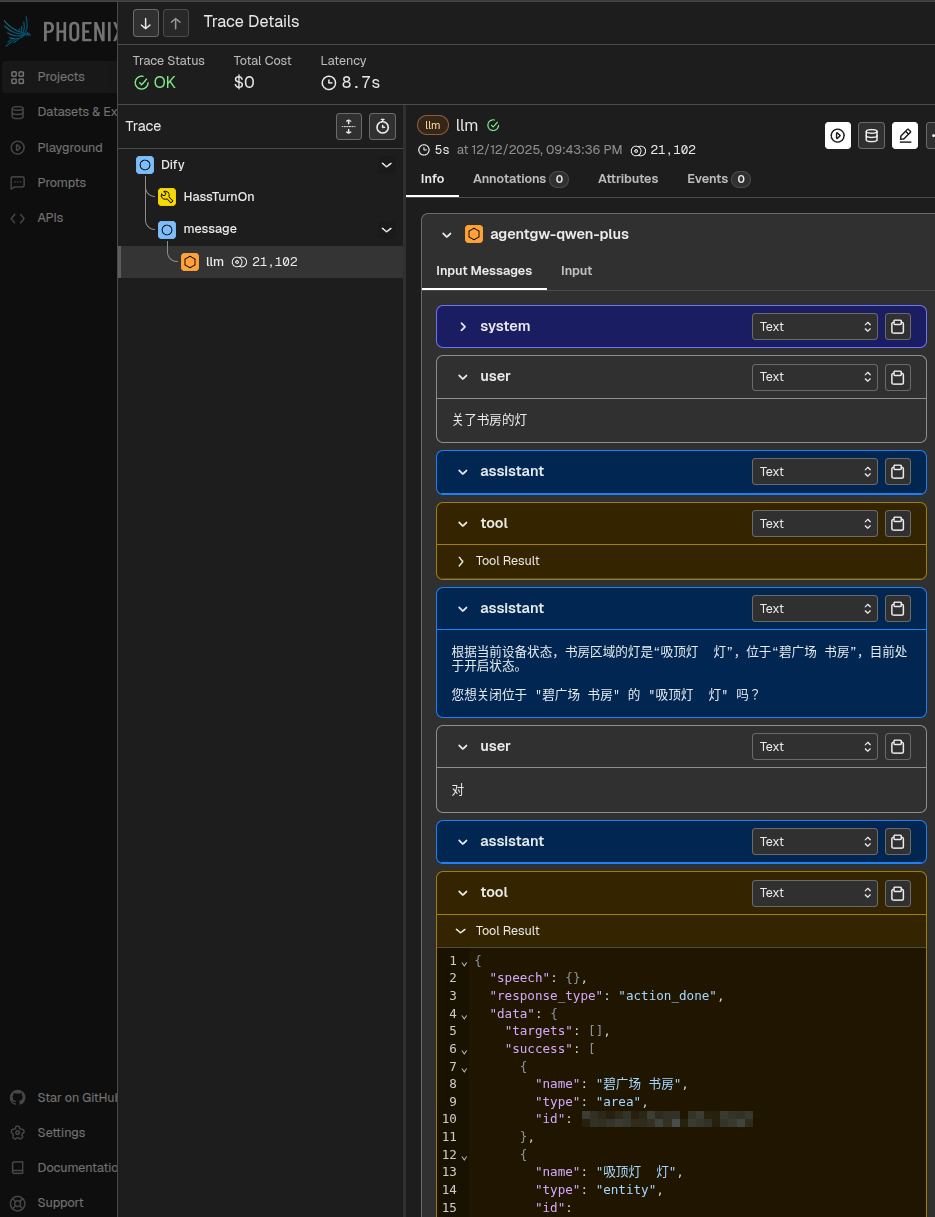
想法
在部署这个简单的 PoC(proof of concept) 过程中,我真实感受到一个简单 Agent 的 “开发” 过程。如果要实用,就算简单加上 TTS 和语音识别,也不足以实用。不过当我让 ChatGPT 生成一个简单的 prompt,直接贴上 Dify 中,第一次用 chat 方式打开书房的灯时,还是有点 “神奇” 感觉。然后体验自然语言 chat 方式的灵活,和不需要编码直接支持 i18n 交互。
后来,发现各种坑,在 prompt 上打补丁。然后发现接入 agentgateway 的确很方便地统一配置。不过要完美实现 tracing 真的很难。所以为 agentgateway 也提了个 issue: Failed to add ’llm.prompt’ to my tracing span in my env 。
整个下来,体验是 AI Agent 开发和传统应用程序开发最大的不同是由于 LLM 的不确定性,可观察性更重要了。因为 tracing 的数据和用户的 feedback 是提升 AI Agent 满意度的数据来源。同时,这个 tracing 的实现难度,因为不确定性,也会比传统应用程序更难实现。传统应用程序的这些运维数据,主要使用者是技术运维。但对于 AI Agent,更多是业务方去评估 Agent 质量。