This article explains how to self-host an OpenClaw AI assistant using a Matrix chat channel. It covers setting up a Matrix server, installing and troubleshooting the OpenClaw Matrix plugin, configuring access policies, and enabling secure, private AI interactions without relying on third-party messaging platforms.
OpenClaw and the Matrix Channel
Undeniably, OpenClaw has been somewhat overhyped. However, from the perspective of AI agent development, it introduces an interesting approach to building self-hosted AI assistants. The core idea is to use instant messaging platforms (such as WhatsApp, Telegram, Matrix, etc.) as the primary interface for interacting with an AI agent. This significantly simplifies deployment and remote access, as users only need an IM client and do not have to deal with port forwarding or complex network configurations.
Many technical users are drawn to OpenClaw because of its self-hosting capabilities. While fully self-hosting a local LLM is still unrealistic for most people due to hardware requirements, self-hosting the OpenClaw Matrix channel is a practical alternative. This setup allows users to benefit from OpenClaw while using a private Matrix channel for communication. By self-hosting the Matrix server, users retain full control over their data and can interact with their AI agents in a secure, private environment without relying on third-party platforms.
Setup a Matrix Chat Server
I chose tuwunel, the official successor to conduwuit, as my self-hosted Matrix server.
After completing the setup, I created a Matrix user named openclaw and generated an access token using the following request:
|
|
Set Up the OpenClaw Channel
Before continuing, it’s worth noting that both OpenClaw and the OpenClaw Matrix plugin are still in an early stage of development. You may encounter issues during the setup process. The steps below reflect what worked in my environment and should help you get the Matrix channel running successfully.
Install the Matrix Channel Plugin
Before installing the plugin, it’s a good practice to monitor the OpenClaw logs:
|
|
Then install the plugin:
|
|
Plugin Installation Issue 1: Duplicate Plugin ID
After installation, you may see an error like this:
Config warnings:
- plugins.entries.matrix: plugin matrix: duplicate plugin id detected; later plugin may be overridden
(/home/mark/.nvm/versions/node/v24.13.0/lib/node_modules/openclaw/extensions/matrix/index.ts)
This usually happens when the plugin exists in both of the following locations:
~/.nvm/versions/node/v24.13.0/lib/node_modules/openclaw/extensions/matrix~/.openclaw/extensions/matrix
If so, remove the duplicate directory:
|
|
Plugin Installation Issue 2: Missing Dependencies
If you see an error like this:
[plugins] matrix failed to load from /home/mark/.openclaw/extensions/matrix/index.ts:
Error: Cannot find module '@vector-im/matrix-bot-sdk'
It indicates missing dependencies. Installing them globally resolves the issue:
|
|
Configure OpenClaw
Edit ~/.openclaw/openclaw.json and add the following configuration:
|
|
CAUTION: The
openpolicy means that any Matrix user on your homeserver can message the OpenClaw bot. This configuration is intended for testing only. For production use, consider restricting access and disabling federation on your Matrix server.
After saving the configuration, restart OpenClaw gateway to apply the changes:
|
|
Test the Matrix Chat Channel
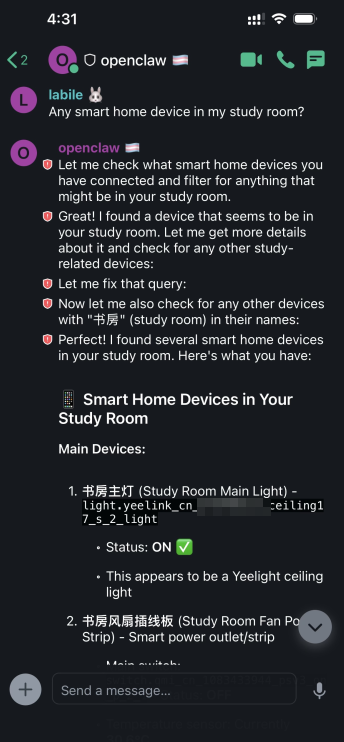
Once configured, you should be able to interact with OpenClaw via your Matrix client: