
This article demonstrates how OpenClaw Skills can orchestrate Home Lab and Smart Home intelligently. By encapsulating infrastructure knowledge, monitoring systems, ann automation APIs to structured Skills. An AI agent can troubleshooting servers, visualize operations by smart lights, and deliver a summarized real time web news through smart speaker.
Background
I have been running a home lab and a small home set up for years. Ask more and more devices and services were add, maintenance and management gradually become increasingly complex. Meanwhile, after years of experience, I realized that traditional smart homes are not fully “smart”. Most of the problems exist simply because I was too lazy to automate them probably. Now, modern AI may help mitigate those issues.
I have maintained my home lab for over 5 years. It hosts many useful services across multiple Linux machines. I also run a Home Assistant instance to manage various smart home IoT devices. For observability, I deployed Prometheus and Grafana, along with alerting for both hardware and software failures.
However, when I received alerts on my phone. I still need to manually investigate and troubleshooting the issue. If I’m away from home. Troubleshooting from a fun becomes inconvenient and inefficient. This is where OpenClaw can help. Ideally, I should just give it some guidance, and it should execute the necessary operations for me.
As a home lab and smart home administrator, three skills are required:
- Home lab environment knowledge — including machine inventory, service deployment details, and monitoring architecture.
- Home Assistant
- Prometheus API
Use Cases
Home Lab Troubleshooting and Root Cause Analysis
Find the service consuming the most CPU on a server and announce the result through the smart speaker. This is especially useful when receiving high CPU usage and high temperature alerts.
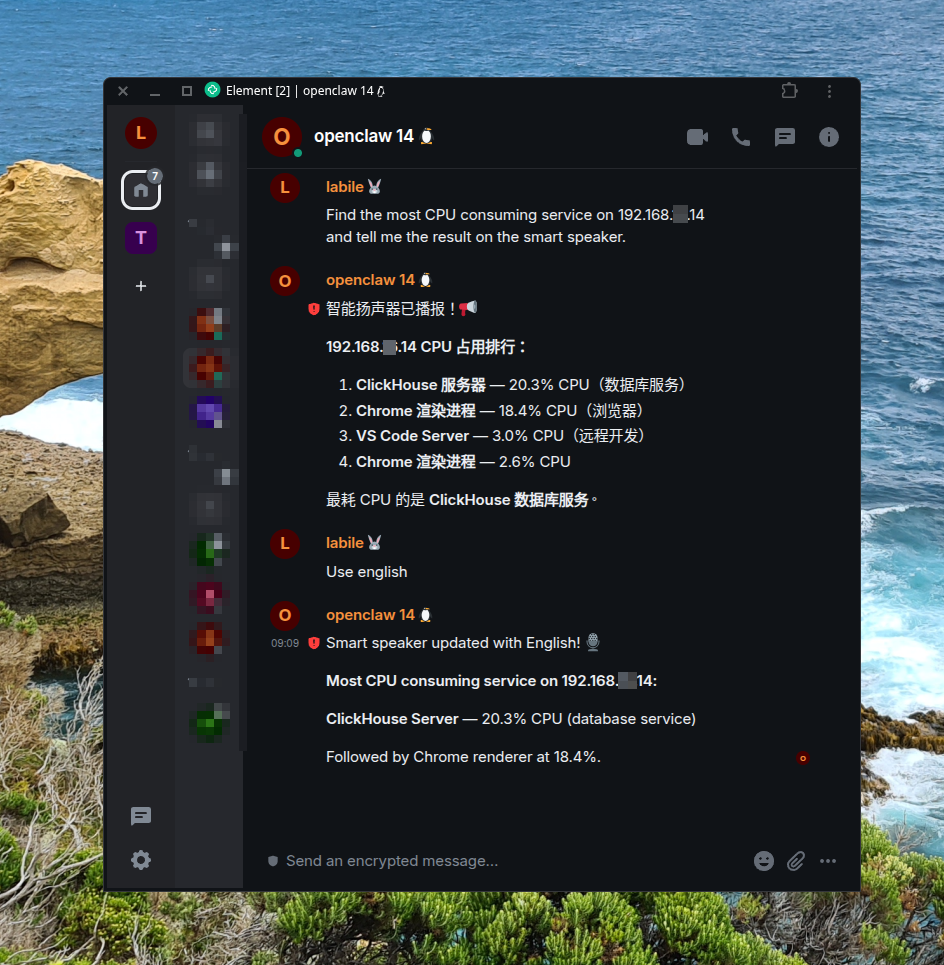
Home Lab “Vibe Master”
Reboot a specific server. Then immediately turn up the study room light. When the machine finishes booting and all services were fully initialized turn the light back on.
This set up visualize the reboot progress in a physical way when I am in the study room.
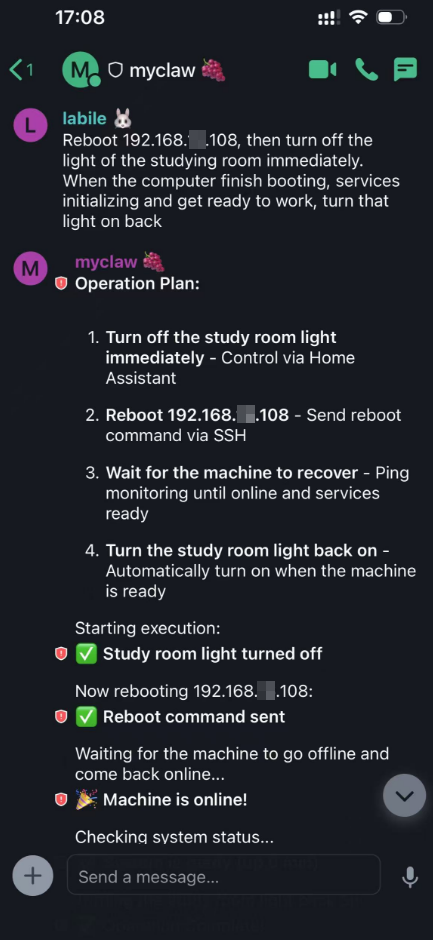
AI-Driven Smart Home Control
Summarize Hacker News (https://news.ycombinator.com/) In Chinese, read the summary aloud through the smart speaker.
This is useful when doing some housework but still wanting to stay updated.
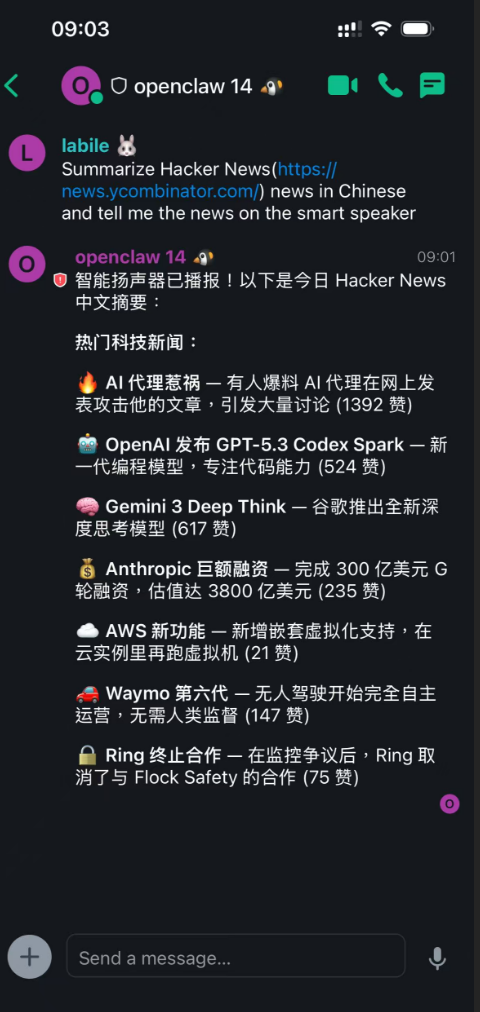
Skills
To enable this. I first need to introduce the home lab environment to OpenCraw. This includes:
- A list of Linux machines.
- The services running on each machine.
- Monitoring system details.
- Operational rules the agent must follow.
I do not want to place all this information directly into the regular LM context. As it would quickly exhaust the context window and waste tokens. Anthropic Skills provide a clear solution. I can encapsulate the home lab environment into a skill. And OpenCraw can load it on demand.
Notice: The following skill code snippets have been simplified for read readability.
Skill of Home Lab Environment
~/openclaw/workspace/skills/home-lab/SKILL.md
|
|
Skill of Home Assistant
Base on the Home Assistant API manual. I have created a web hook on my Home Assistant which can send notification to my XiaoMi smart speaker 🔊 . So I just tell the agent how to use the API in the following skill document.
|
|
Skill of Prometheus API
Base on Prometheus API manual
Future Use Cases
Proactive Agent
The agent should proactively monitor and handle the home lab status and smart home events. User can describe the desired behavior in natural language, and the agent can translate it into monitoring rules, alerting rules, or automation rules.
For example: Automatically trigger troubleshooting, investigation and root cause analysis via Prometheus Alertmanager by integrating OpenClaw webhooks.
Manage My Home Inventory
Manage my Homebox in natural language which is a self-hosted home inventory management system. For example, when I buy a new device, I can just tell the agent “I bought a new iPhone 15 Pro Max, please add it to my home inventory”
Security Risk Warning
Giving an AI agent the ability to execute commands on your home lab and control your smart home devices carries significant security risks. The agent could be exploited by attackers to gain unauthorized access, cause damage, or steal sensitive information. Download and Install any Skill only from trusted sources. Always review the code of any Skill before installing it. Consider running the agent in a sandboxed environment with limited permissions to mitigate potential risks.