As a software engineer, my life has always been a blend of the digital and the physical. By day, I build complex architectures for large corporations, helping them manage their vast digital assets and streamline operations. By night (and on weekends), I’m a tinkerer. Whether it’s writing a custom script to automate my lighting, setting up a cluster of Raspberry Pi servers in my basement, or performing a DIY oil change on my car, I find immense joy in hands-on projects.
However, there was a growing shadow over my hobbies: The Chaos of Stuff.
The “Gadget Tax”
For years, I lived with a persistent, low-level stress. My home was becoming a graveyard of “lost but present” items. I had cables for devices I no longer owned, and I couldn’t find the cables for the devices I did own. I had drawers full of sensors, microcontrollers, and car parts that were essentially invisible because they weren’t organized.
The breaking point usually came in one of two ways. First, the “Duplicate Purchase”: I’d buy a specific OBD-II scanner or a high-speed USB-C cable for a project, only to find the exact same item three months later tucked away in a mislabeled box. Second, the “Family Friction”: My wife would ask where the spare batteries or a specific tool was, and my response—a vague gesture toward the garage or the study—didn’t exactly foster domestic harmony.
I realized I was suffering from a classic case of “the shoemaker’s children have no shoes.” I spent my professional life organizing data for companies, yet my personal inventory was a disaster. I needed to “Eat My Own Dog Food.”
Discovering Homebox: The Self-Hosted Solution
My journey into self-hosting started with media servers and home automation, but it wasn’t until I discovered Homebox (homebox.software) that I found the missing piece of my digital home.
Homebox is an open-source, self-hosted inventory management system designed specifically for home users. Unlike industrial-grade asset managers that are over-engineered for a household, Homebox is lean, fast, and remarkably intuitive. Built with Go and using a SQLite backend, it’s lightweight enough to run on one of my Raspberry Pis without breaking a sweat.
The Setup: From Boxes to Bits
The installation was the easy part. A quick docker-compose setup, and I had a clean, responsive web interface ready to go. The real challenge, as any data engineer knows, is the data entry.
At first, I’ll admit, I was lazy. Looking at the sheer volume of my “tech hoard,” I almost gave up before I started. But I decided to apply a basic management principle: start small and iterate. I focused exclusively on my study room—the “command center” where I keep my homelab devices, soldering equipment, and various gadgets.
I began by creating a hierarchical structure of Locations. In Homebox, you can nest locations, so I set up:
-
Study Room
-
Storage Cabinet A
-
Shelf 1 (Microcontrollers)
-
Shelf 2 (Cabling)
-
Desk Drawer
Then came the Items. For each piece of hardware, I logged:
- Name & Description: Clear, searchable titles.
- Purchase Date & Cost: Great for tracking my “tinker budget.”
- Warranty Info: No more digging through emails for PDF receipts; I just attached them to the item entry.
- Tags: This is where the power lies. I tagged items with things like
#automotive,#esp32,#usb-c, or#raspberrypi.
The Turning Point: The Case of the Missing Keys
For a few weeks, Homebox was just a “theoretical” tool. I was inputting data, but I hadn’t truly needed it. That changed on a Tuesday morning when I was already ten minutes late for a meeting and my car keys were nowhere to be found.
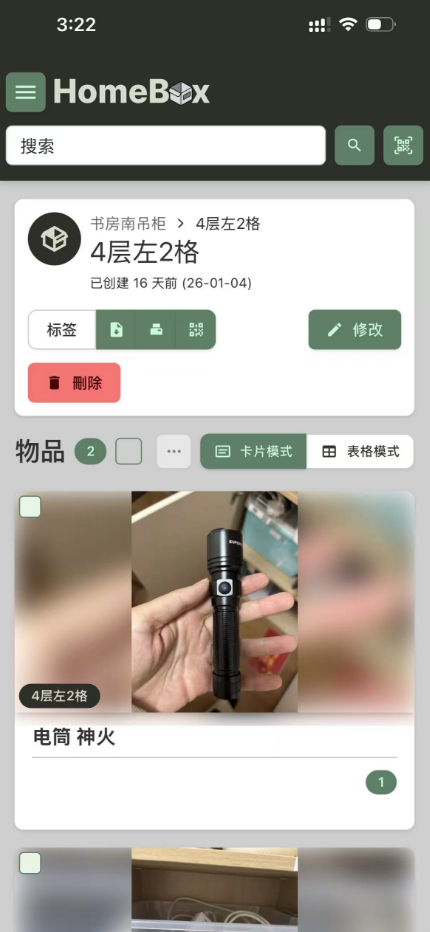
After a frantic five-minute search under sofa cushions and in coat pockets, I had a flash of memory. Did I log these? I pulled up the Homebox instance on my phone, typed “Keys” into the search bar, and there it was. I had tagged them as an “Asset” and noted their location: Study Room -> Desk Drawer (Small Organizer).
I had placed them there while working on a project the night before to keep them away from some solder flux. Seeing that exact location on my screen saved me another twenty minutes of stress. At that moment, Homebox transitioned from a hobby project to an essential life tool.
Features That Changed the Game
Once I saw the practical value, I went “all in.” Here are the features that make Homebox stand out for a tech enthusiast:
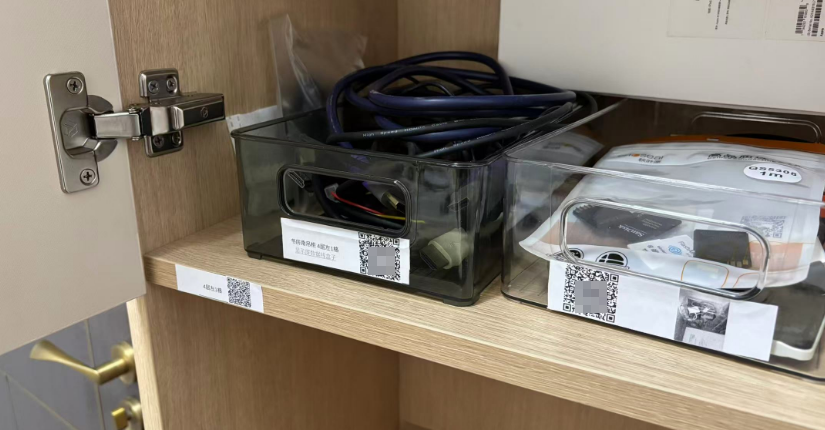
- QR Codes & Labels: Homebox can generate QR codes for every item and location. I’ve started printing small labels for my opaque storage bins. Now, instead of digging through a bin to see what’s inside, I just scan the QR code with my phone, and Homebox shows me the full inventory of that box.
- Maintenance Schedules: For my car maintenance parts, I can set reminders. If I have a spare set of brake pads or oil filters, I can track when they should be used or when I need to check my stock levels.
- Shared Responsibility: This was the biggest win for my marriage. I gave my wife access to the system. Now, when she needs a specific tool or even just wants to know if we have a spare HDMI cable, she can check the inventory herself. It’s fostered a sense of shared ownership and drastically reduced the “Where is…?” questions.
- Financial Wisdom: Before I hit “Buy Now” on Amazon, I do a quick search in Homebox. It’s saved me hundreds of dollars by reminding me that I already have a pack of resistors or a specific adapter hidden in a “to-be-sorted” bin.
Final Thoughts
If you’re a tech enthusiast, a DIYer, or just someone tired of the “where is that thing?” mental tax, I cannot recommend Homebox enough. It’s more than just a database; it’s a way to reclaim your time and space.
As a Software Engineer, I’ve realized that the principles we use to keep enterprise systems running—organization, documentation, and accessibility—are just as vital at home. My dog food tastes pretty good, and thanks to Homebox, my study room finally looks like a lab instead of a junk heap.